


Clock - Simple Alarm Clock
4.553.00 Reviews
App Specs
- Version
- 26.0
- Updated On
- License
- Free
- Downloads
- 1,000,000+
- Developer
- Advance Logic
- Categories
- Productivity
- Platform
- Android
Screenshots
 Analysis by AppCompare
I have always liked alarm apps that stay focused on one job, and Clock - Simple Alarm Clock takes that approach seriously. It is a free productivity app from Advance Logic built around waking up, remembering tasks, choosing a visual style, and keeping useful clock tools close at hand. After spending time with it, I see it as a practical alternative to relying only on the basic clock already installed on a phone.
The appeal is easy to understand: the app combines an alarm clock, reminders, themes, widgets, and bedtime-oriented tools in one place. That makes it more flexible than a bare alarm screen, while still feeling less complicated than a full sleep-tracking platform. My experience is that its strongest quality is not one spectacular feature, but the way it brings several small daily routines together.
How the alarm experience fits into everyday routines
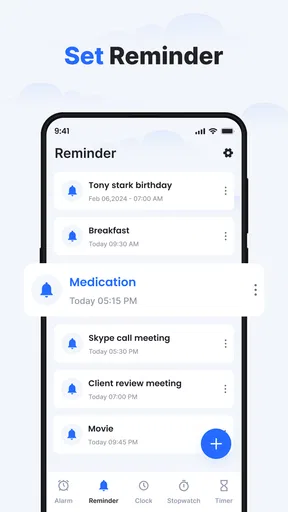
The first thing I noticed is that the app is designed for people who want their phone to act as both a morning alarm and a lightweight routine assistant. A normal alarm handles a single wake-up time, but reminders can be useful for medication, leaving for work, starting a study session, or winding down at night. That broader role gives the app a reason to remain installed even when I am not changing my morning schedule.
The bedtime angle is especially useful for users who treat sleep as a routine rather than just a wake-up event. Instead of thinking only about when the alarm rings, I can use the clock as a prompt to begin preparing for bed. That distinction matters. A wake-up alarm reacts to the end of the night; a bedtime reminder can help shape what happens before it.
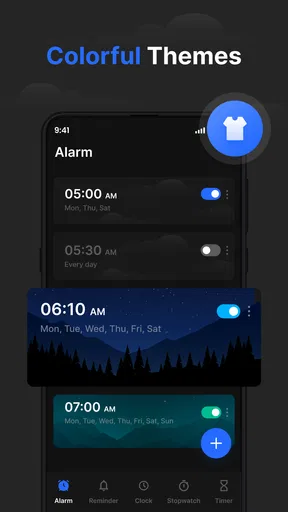
I also found the visual customization more meaningful than it may sound at first. Themes are not essential to setting an alarm, but a clock that looks comfortable on a bedside table or desk is easier to keep open and use regularly. The choice is practical rather than dramatic: people who dislike the appearance of the default system clock may find this app more pleasant to live with.
Widgets add another layer of convenience. They can make the current clock or alarm-related information visible without requiring me to open the full application each time. That is helpful when I am checking the time while working, studying, or getting ready. It also turns the app into a more visible part of the phone’s home screen instead of something I remember only when I need to set an alarm.
Where connectivity changes the experience
Because this is a mobile app, the surrounding phone environment still affects how dependable the experience feels. Notifications, background behavior, battery management, and system settings can all influence how reminders appear. I would not treat any alarm application as completely separate from the operating system that runs it. Before trusting it for an important morning, I would check that the app is allowed to behave normally in the phone’s notification and battery settings.
Worth Reading Before You Choose

EA SPORTS FC Mobile 26 Is a Bigger Football Game, but It Takes Time

Flipboard Shows What News Apps Must Do Beyond the Feed

Switching to Android Auto Means Rethinking Your Driving Routine

Google Calendar Makes a Crowded Week Easier to Manage

Ludo King Makes the Most of the Minutes Between Plans

Baby Panda World Brings Quick Play to Modern Phones, but Its Game Library Feels Busy
This is also why I would test a new alarm during an ordinary day rather than waiting for an important appointment. Set a nearby reminder, let the phone sit for a while, and confirm that the alert appears in the way you expect. That small trial is more useful than assuming every phone handles background alerts identically.
The app’s network relationship should also be viewed realistically. A clock and alarm tool does not need to feel like a social or streaming service, but the phone’s connectivity can still shape setup, updates, and the wider mobile experience. I would avoid making a blanket assumption about every function working in every connection state. If I were traveling, using a restricted data plan, or preparing for a flight, I would configure the important alarms ahead of time and verify them before depending on them.
That habit is not a criticism aimed only at this app. It is simply good alarm practice. A phone can be muted, restarted, low on battery, or affected by a system rule that the user forgot was enabled. The app gives me useful tools, but reliability also depends on how carefully I prepare the device around it.
Useful mobile situations beyond the bedside
Although the name suggests a bedroom, I found several situations where the app makes sense away from home. A student could use one reminder for a study block and another for a planned break. Someone working irregular hours could create separate wake-up routines instead of forcing every day into one schedule. A traveler could use a reminder to leave for the station, then keep a different alarm for the next morning.
Widgets are particularly well suited to these mobile contexts because they reduce the number of taps needed to check the time or see the clock on the home screen. That can be useful when the phone is being used for navigation, music, or a work task. The trade-off is that a widget occupies screen space, so users with a tightly organized home screen may prefer the regular app view instead.
One realistic example is a workday morning. I might set a wake-up alarm, add a reminder to leave the house, and place the clock widget where I can see it while preparing breakfast. At night, a bedtime prompt can encourage me to stop scrolling and begin getting ready. The value comes from linking those moments into one routine rather than scattering them across separate apps.
For people who travel across time zones, I would be more cautious. An alarm app can be useful, but time changes and automatic phone settings deserve attention before setting a critical alert. I would check the displayed time after arrival and create a test reminder if the schedule matters. That extra step is sensible whenever the phone’s clock is changing automatically.
Recovery when an alarm or reminder goes wrong
The most important question for an alarm app is not how attractive the theme looks; it is what happens when something interrupts the routine. I prefer to think in terms of recovery. If I accidentally dismiss an alarm, miss a reminder, or change a setting, can I quickly understand what happened and rebuild the schedule?
My approach with this app is to keep important routines simple. I would avoid creating a confusing collection of nearly identical alarms. Clear labels and distinct times make mistakes easier to spot. For a major appointment, I would also use a second dependable method, such as another device or a conventional backup alarm, rather than treating a single phone as the only safeguard.
That may sound overly cautious, but it is a fair limitation of smartphone alarms in general. The device can run out of power, be left in another room, or be silenced by the user. The app can improve organization, but it cannot remove every physical or system-level failure point. Its best role is as a convenient daily tool, not as the sole protection against missing something genuinely important.
Recovery is easier when I review the routine before going to sleep. I can confirm the time, check whether the intended reminder is still present, and make sure the phone is ready for the night. This is one of the less obvious benefits of having alarms, reminders, bedtime prompts, and clock tools together: the entire routine is easier to inspect in one place.
I would also be careful when changing themes or rearranging widgets close to bedtime. Customization is enjoyable, but last-minute adjustments are exactly when users can overlook an alarm setting. My practical rule is to personalize the appearance earlier, then leave the functional setup alone once the night routine begins.
Using it without wasting attention or data
The app is free, which lowers the barrier to trying it, and its Everyone age rating makes it suitable for a broad audience. Still, free does not mean every user will want another app involved in a basic phone function. If the built-in clock already handles alarms, reminders, and bedtime habits well enough, installing a separate tool may add one more place to manage settings.
For data-conscious users, I would treat the app as a focused utility rather than something that should constantly demand attention. Use the features that solve a real problem: a reminder for a recurring obligation, a widget for quick visibility, or a theme that makes the interface easier to read. There is no reason to keep opening it simply because it is installed.
Connectivity habits matter here as well. I would configure essential routines when the phone is in a stable state, avoid changing several settings at once, and test an important alert before relying on it. Users with limited mobile data can also make a general habit of handling app setup and updates when connected to a trusted network, without assuming that every part of the experience behaves the same way in every connection condition.
Privacy-conscious readers may prefer to keep their use minimal and avoid giving any app more role in their routine than necessary. Since this is a clock and reminder tool, I would not expect it to replace a dedicated sleep tracker, calendar, or task manager. Its strength is concentration: it gives time-based prompts and clock access without asking me to build an entire productivity system around it.
The current version is 25.0, and the app has reached more than one million installs with a 4.5 average from roughly 7.4 thousand ratings. Those figures suggest that the concept has found a substantial audience, but they do not change the basic buying decision: the right question is whether its combination of alarms, reminders, themes, widgets, and bedtime tools fits the way you organize your day.
How it compares with the usual alternatives
The obvious alternative is the clock app that already comes with an Android phone or iPhone. Built-in clocks usually win on familiarity and system integration. They are already present, easy to trust, and often sufficient for a single daily alarm. If all I need is one wake-up time and I never use widgets or bedtime reminders, the default option may be the better choice.
Clock - Simple Alarm Clock becomes more interesting when the basic clock feels too limited. Its combination of visual themes, home-screen access, reminders, and bedtime planning gives it a broader daily role. I would choose it over the standard clock when I want a more personal interface or when a morning alarm is only one part of my routine.
It is also different from a specialized sleep application. Sleep-focused apps often center on tracking, analysis, or coaching. This app is more direct: it helps me schedule time-based prompts rather than interpret my sleep in depth. That makes it less suitable for someone seeking detailed sleep insights, but more suitable for someone who wants fewer layers between setting a routine and following it.
Task managers and calendar apps are another comparison point. They are better for projects, appointments, notes, and complex planning. This clock is better for moments that must happen at a particular time and need a clear alert. I would not move an entire work system into it, but I would use it alongside a calendar for small, repeatable time cues.
The developer, Advance Logic, has positioned the product in a useful middle ground: more capable than a plain clock, but not so broad that it becomes a general productivity suite. That balance is its main identity. The limitation is that users wanting extensive scheduling, detailed tracking, or deep automation may quickly reach for a more specialized alternative.
Who should install it and who should pass
I think it is a good fit for someone who wants a cleaner, more customizable alarm routine without paying for another productivity service. It is also appealing to people who like seeing a clock on the home screen, need reminders tied to daily habits, or want bedtime prompts alongside morning alarms. Families and younger users may appreciate the Everyone rating, while anyone can try it without a purchase price.
I would skip it if the phone’s existing clock already does everything needed and I dislike maintaining duplicate tools. I would also look elsewhere if my priority is advanced sleep analysis, a full calendar workflow, or highly complex task management. Adding this app in those situations could create more overlap than value.
For a first setup, I would create only the alarms and reminders I genuinely need, choose a readable theme, place the widget only if it saves time, and run a test alert before relying on the app overnight. Then I would review the routine after a few days. If the extra visibility and bedtime structure are helping, the app has earned its place; if I keep returning to the built-in clock, there is little reason to force the change.
Released on February 8, 2024, Clock - Simple Alarm Clock has developed into a focused productivity companion rather than merely another digital clock. My overall impression is positive because it respects a simple idea: time tools are most useful when they fit naturally into real routines. Its best advantage is the combination of practical reminders and quick clock access without turning the experience into a complicated planning system.
Connectivity does not define the app, but it is part of using any phone-based alarm responsibly. I would prepare important schedules in advance, check the phone’s behavior, and keep a backup for critical events. With that sensible caution, this free app is worth trying if the default clock feels too plain and a more organized, visually flexible routine would genuinely help.
In the end, I recommend Clock - Simple Alarm Clock to users who want alarms, reminders, bedtime prompts, themes, and widgets gathered into one approachable tool. I would not call it a replacement for every productivity or sleep app, but for everyday time cues it offers a useful middle ground. If you want a straightforward clock with a little more personality and routine support, Clock - Simple Alarm Clock is a sensible option to test.
Pros
- Clean
- uncluttered interface makes alarms quick to create.
- Large snooze and stop controls are easy to use half-awake.
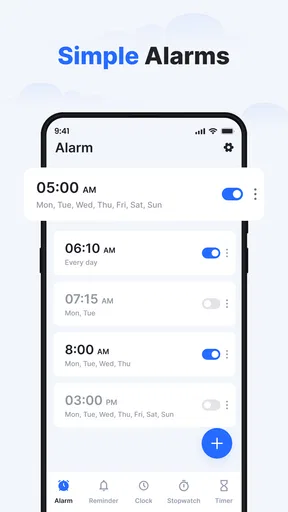
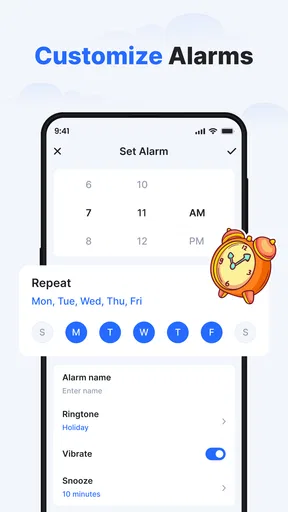
- Supports recurring alarms for different days of the week.
- Alarm labels help identify reminders without opening the app.
- Lightweight design uses little storage and battery power.
Cons
- Limited customization may disappoint users wanting advanced alarm themes.
- No built-in sleep tracking or detailed sleep insights.
- Some features may depend on device notification permissions.
- Lacks extensive smart alarm or gradual wake-up options.
- A basic interface may feel too simple for power users.
FAQs for Clock - Simple Alarm Clock
What is Clock - Simple Alarm Clock and what can it do?
Clock - Simple Alarm Clock is designed for users who want a straightforward way to manage alarms and wake-up times without unnecessary features. After testing it, the app feels focused on the essentials: creating alarms, choosing repeat days, setting alarm sounds, and checking the current time. Its simple layout makes it suitable for everyday use, especially if you prefer a clean alternative to more complicated clock applications.
Can I create repeating alarms for specific days of the week?
Yes, the app supports the type of recurring alarm scheduling most people need for daily routines. You can set an alarm for selected days, such as weekdays, weekends, or individual days, rather than creating a new alarm every morning. This is useful for work, school, medication reminders, and regular appointments. Before relying on it, check that the selected repeat days and alarm time are displayed correctly.
Will the alarm work when my phone is locked or the app is closed?
The alarm is intended to operate through the device’s normal notification and alarm systems, so it should remain available when the screen is locked or the application is not open. However, reliability can depend on Android or iOS settings, notification permissions, battery optimization, silent modes, and manufacturer-specific restrictions. For important alarms, allow the requested permissions and test the app once before using it overnight.
Can I customize the alarm sound, volume, or snooze behavior?
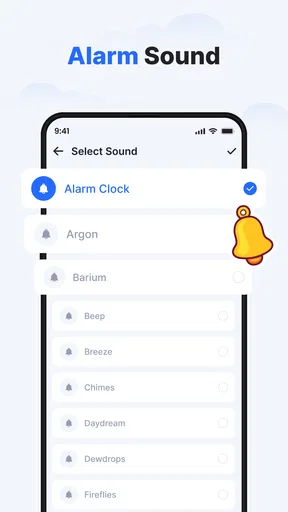
Clock - Simple Alarm Clock provides the basic controls users generally expect from an alarm application, including selecting an alert sound and adjusting the alarm experience through the available settings. Depending on the version and device, some behavior may also be affected by the phone’s system volume or sound mode. Review the settings carefully, particularly if you need a loud alarm or prefer a specific snooze arrangement.
Is Clock - Simple Alarm Clock free, safe, and suitable for everyday use?
The app is aimed at simple everyday timekeeping and alarm management, making it easy to use without a lengthy learning process. Whether it is completely free, contains advertising, or offers optional purchases can vary by platform and app version, so confirm the current store listing before downloading. Also review the permissions requested during installation. For regular use, keep notifications enabled and update the app when improvements or compatibility fixes are released.


